Tuesday, April 30, 2013
Touch Screen Calibration on SonyEricsson
On SonyEricsson phones that use touch screen (like P1, M600, W960, etc.), it is difficult for some users find the menu to calibrate, even though these have been provided. Calibration is the level of service light on a touch screen phone before doing repair software or hardware.
To perform the calibration on the touch screen sonyericsson follow these steps:
See More Detail[...]
To perform the calibration on the touch screen sonyericsson follow these steps:
Use the scroll button on the side to select the menu 1. go to menu 2. select tools / settings 3. select control panel 4. select other 5. select the setup wizard, and press next until the display calibration appears, do the calibration using the stylus by touching on the blinking point (there are 4 points) 6. press next until save options appear, and then save. If youve done the steps above but the touch screen problem has not been completed, repair software or hardware may make sense for your phone to be normal again. | 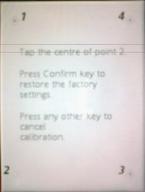 |

Friday, April 12, 2013
Samsung B520 Specs Review Manual
Samsung B520 is one of Samsung mobile phones that use slide design, this phone has been introduced in late December 2008 and released to the market in 2009. This phone works on GSM networks, but does not yet support 3G networks. In this post, Samsung cell phone manuals provide some information related to the Samsung B520 includes the user manual document, review features, and complete specifications.

Samsung B520 has dimensions of 96 x 47 x 17.5 mm with a weight of 94 g. On the display, this phone uses CSTN display, 65K colors. You can use the wallpaper and screen saver on the phone. In the audio, you can use mp3 files as ring tones and for specific needs, this phone is also equipped with a loudspeaker and 3.5 mm audio jack.
For data storage, the Samsung B520 is equipped with an external memory slot with a maximum permissible capacity of up to 2 GB. In addition to the external memory, the phone also has an internal memory with a capacity of 20 MB. For storage of phone numbers, the Samsung B520 can accommodate up to 1000 phone numbers.
In addition to some of the features previously mentioned, the Samsung B520 also has an online feature, this phone can connect to the internet via GPRS. As for his class GPRS is Class 10 (4 +1 / 3 +2 slots), 32 - 48 kbps. To exchange data with other devices such as laptop or computer, the phone comes with a USB port.
Here are some of the features offered by Samsung mobiles through Samsung B520:
For data storage, the Samsung B520 is equipped with an external memory slot with a maximum permissible capacity of up to 2 GB. In addition to the external memory, the phone also has an internal memory with a capacity of 20 MB. For storage of phone numbers, the Samsung B520 can accommodate up to 1000 phone numbers.
In addition to some of the features previously mentioned, the Samsung B520 also has an online feature, this phone can connect to the internet via GPRS. As for his class GPRS is Class 10 (4 +1 / 3 +2 slots), 32 - 48 kbps. To exchange data with other devices such as laptop or computer, the phone comes with a USB port.
Here are some of the features offered by Samsung mobiles through Samsung B520:
- SMS, MMS, Email
- WAP 2.0/xHTML, HTML
- FM radio, FM recording, dedicated key
- Java MIDP 2.0
- Organizer
- Voice memo
- Predictive text input
Jailbreak Unlock iPhone iOS 6 1 Using Ultrasn0w Fixer

This Tutorial will help you to unlock iOS 6.1 Ultrasn0w free unlocking tool that is compatible with older basebands, to preserve your iOS 6.1 base band you need to create custom iOS 6.1 iPSW using Redsn0w 0.9.15b3.
- Baseband 05.13.01 on iPhone 3GS
- Baseband 05.11.07 on iPhone 3GS
- Baseband 05.12.01 on iPhone 3GS
- Baseband 04.26.08 on iPhone 3GS
- Baseband 06.15.00 on iPhone 3GS
Just follow these simple steps and your job will be done without any difficulty
Step 1: Jailbreak your iPhone using our guide.
Step 2: Launch Cydia from your device.
Step 3: Go to Manage > Sources. Tap on Edit, which is located at the top right corner of the screen.
Step 4: Enter the following URL repository: http://repo,iparelhos,com
Step 5: Tap on Add Source.
Step 6: A package for ultrasn0w fixer 6.1 will be displayed. Tap on it to start installation.
Step 7: Download the official Ultrasn0w 1.2.7 tool and that’s it.
If you have some better solution please share it with us .
Samsung B3210 Corby TXT Full Phone Specification Manual Download
Samsung B3210 Corby TXT also known as Samsung B3210 Genio Qwerty, it work on GSM network, but no support for 3G network. It was released on 2009, December, now its available for sale in the market, although just for the second hand. Here, we provide some information relating to the Samsung B3210 Corby TXT including the user manual and user guides document download link, features review, full phone specification, and price information.

General Info
2G network : GSM 850 / 900 / 1800 / 1900
Announced : 2009, September
Status : Available. Released 2009, September
Body
Dimensions : 112 x 59.6 x 12.9 mm
Weight : 94 g
Keyboard : QWERTY
Display
Type : TFT, 256K colors
Size : 220 x 176 pixels, 2.2 inches (~128 ppi pixel density)
Sound
Alert types : Vibration, MP3 ringtones
Loudspeaker : Yes
3.5 mm jack : Yes
Memory
Card slot : microSD, up to 8GB
Phonebook : 1000 entries, Photocall
Call records : Yes
Internal : 40 MB
Data
GPRS : Class 10 (4+1/3+2 slots), 32 - 48 kbps
EDGE : Class 10, 236.8 kbps
Speed : No
WLAN : No
Bluetooth : Yes, v2.1 with A2DP
USB : Yes, v2.0
Camera
Primary : 2 MP, 1600x1200 pixels
Video : Yes
Secondary : No
Features
Messaging : SMS, MMS, Email, IM
Browser : WAP 2.0 / xHTML, HTML
Radio : Stereo FM radio with RDS, FM recording
Games : Yes
GPS : No
Java : Yes, MIDP 2.0
Colors : Black
Others : Fashion Jackets (changeable battery covers), MP3/eAAC+/WMA player, MP4/H.263 player, Organizer, Voice memo/dial, Predictive text input
Battery
Type : Standard battery, Li-Ion 800 mAh
Stand-by : Up to 390 h
Talk time : Up to 7 h 30 min
The user manual and user guides for Samsung B3210 Corby TXT is available online, you can download it here from the link below.
Manual
Thursday, April 11, 2013
Telenore Pakistan General GPRS MMS WAP Manual Settings

Here Is A Useful Article Which Will Help You Activating Internet MMS WAP Services On Your Mobile Phone . Just Follow The Simple Steps To Activate These Services .
Telenore Pakistan General GPRS MMS WAP Manual Settings :VIA SMS ::
Send a text message to 131 with your handset make and model to receive your handset settings:For Example:For MMS :
Write "mms" and SMS it to 131.
MANUAL SETTING :
Please note that your handset needs to be GPRS/WAP & MMS compatible, for you to be able to configure your handset for these services.
Write "mms" and SMS it to 131.
For All handset setting :Write "All" and SMS it to 131.
MANUAL SETTING :
You can also configure your handset for GPRS & MMS manually:
| 1. Configuration for WAP | |
| Access Point Name/Node | wap |
| Login name | Telenor |
| Password | Telenor |
| WAP Gateway IP | 172.18.19.11 |
| Port (if required) | 9201 |
| Port (if required for HTTP handsets) | 8080 |
| 2. Configuration for MMS | |
| Access Point Name/Node | mms |
| Login name | Telenor |
| Password | Telenor |
| WAP Gateway IP | 172.18.19.11 |
| Port (if required) | 9201 |
| Port (if required for HTTP handsets) | 8080 |
| Relay Server/ Messaging Server | http://mmstelenor or http://172.18.15.1 |
ACTIVATION BY CALL :
You can also dial 345 from your Telenor Mobile subscription and our staff will help you configure your handset for GPRS settings.Please note that your handset needs to be GPRS/WAP & MMS compatible, for you to be able to configure your handset for these services.
Samsung Galaxy Note 2 Soon To Be Reality

As per the rumors people are wondering about Samsungs new launch Galaxy Note 2. But BGR.in has confirmed that the Galaxy Note 2, a successor of Galaxy Note will be annonced on the 15th August Independence day. This was announced during companys press conference. There was so many talks about the features of the 2012 version of Samsung Galaxy Note but the reports gave a different turn. As the day for the announcement is special one for Samsung as well.
Samsung Galaxy Note 2 expected features
- Big 5.5 inch Super AMOLED Touchscreen
- 12/ 13 megapixel rare camera & front facing camera
- 1.6GHz quad-core processor
- A front facing camera for video calls and chats
- Expectable Versions: 16GB, 32GB, 64GB
- 4G LTE, EDGE, Wi-Fi, Wi-Fi Direct, NFC, Bluetooth , USB
- GPS with A-GPS support
The launch date is expected in October but still no confirmation regarding it. So, keep waiting for the announcement and people will know which features will be added to the Galaxy Note II.
Projector Phone Videocon V4500 Price India Touchscreen Dual SIM Mobile

Videocons new V4500 is an affordable dual SIM GSM mobile phone with Touchscreen. It features a 2.2 inch touch screen with normal alphanumeric keyboard. The centerpiece of the new Videocon V4500 is built-in projector. Projector mobile phones are becoming popular these days that people like to play with this new feature in mobile phones, even at an affordable price. Watch the video and pictures of some movies using projector mobiles. It has a classic design with the body of metallic colors. It comes with a free extra battery that you can keep loaded and used if a battery is discharged. It has a basic camera and expandable memory up to 8GB The unit comes with 2 GB card preloaded with a full movie (Golmaal returns) and some clips. Accessories Order also external speakers for your multimedia entertainment.
Videocon V4500 Price in India:
Projector Phone Videocon V4500 Price is not relealed yet. (Coming Soon)
Videocon V4500 Features & Specifications:
- Dual Band GSM (900/1800)
- Dual SIM (GSM + GSM), Dual Standby
- Metallic Finish Body
- Built-In Projector
- 2.2-inch QVGA TFT Touch Screen
- 0.3 mega-pixel camera
- Dimension : 113 mm x 49.5 mm x 17 mm
- Memory expandable up to 4GB
- Java support
- Audio Player – MIDI/AMR/MP3/WAV
- Video Player : MP4 & RMVB
- Connect wireless via bluetooth
- 850 mAh Battery
- up to 2.5 hrs Talk Time
- 200 hrs Standby Time
- 1 additional battery free with mobile
In Box Accessories:
- Handset
- Charger
- Data Cable
- Handsfree
- 2 Battery of 850 mAh each
- 2GB Micro SD Card with pre-loaded 1 full length movie (Golmaal Returns), 5 Hollywood & 4 Bollywood movie clippings
- 1 Apple shaped speakers
- 1 Screen (38 cm)
- User Manual
- Warranty Card
- Service Centre Directory
Subscribe to:
Posts (Atom)